
Customer Details & Shipping
Collect customer details and approve fixed or dynamic delivery totals for cards, Apple Pay, and Google Pay.

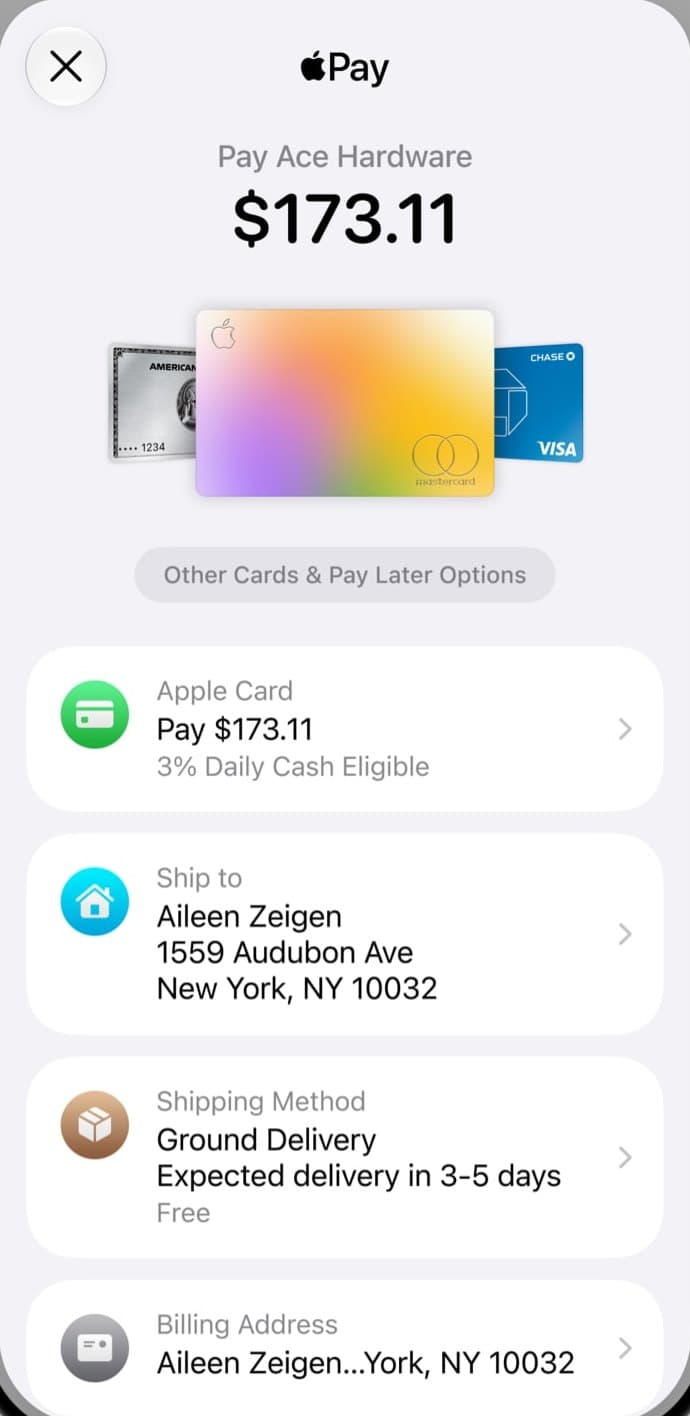

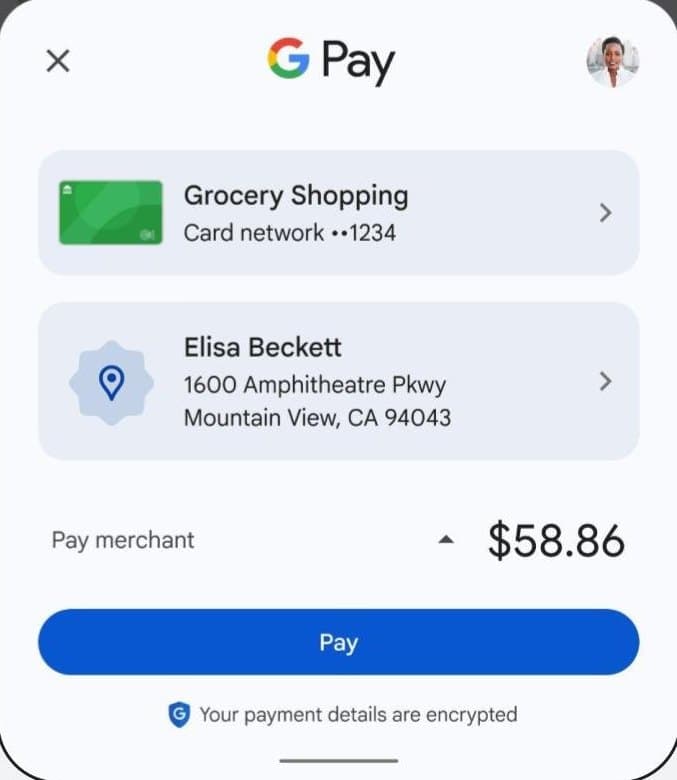
Collect contact details and a delivery address at checkout, offer delivery options, and charge only a total your server approved. The same settings apply to the card form, Apple Pay, and Google Pay, in both Hosted and Embedded Checkout.
What the wallet sheet collects
Apple Pay and Google Pay do not use your form. They open their own payment sheet, ask for the details you request, and return them to you.
| In the sheet | You request it with | You read it from |
|---|---|---|
| Delivery address | shippingOptions | customer.shippingAddress |
| Delivery method | shippingOptions options or approved quotes | shippingQuote |
| Email, name, phone | customerCollection | customer, and walletContact for receipts |
| Billing address | customerCollection.billingAddress | customer |
| Total | Your server approves it | The payment, read on your server |
If the total changes, the shopper authorizes again in the sheet, and an expired quote is refused before charging.
Where Apple Pay and Google Pay differ
| Apple Pay | Google Pay | |
|---|---|---|
| Before it appears | Embedded Checkout needs an active shop domain. Cross-origin Apple Pay needs Safari 17 or later. | Live payments need a configured Google Pay merchant ID. |
| Delivery | Needs supported native shipping callbacks. Otherwise card entry remains available. | Native shipping callbacks. |
| Testing | Real supported devices only. | Real supported devices. A simulated TEST sheet does not verify production behavior. |
A wallet button also depends on the shopper's device and browser, so enabling a wallet does not guarantee it appears everywhere. See Checkout settings. For design rules, see Apple's Apple Pay guidelines and Google's Google Pay brand guidelines.
Implementation
Collect contact and billing details
Set the fields to collect when creating a hosted session or embedded payment:
customerCollection: {
	email: 'required',
	name: 'optional',
	phone: 'optional',
	billingAddress: 'none',
}- Each field accepts
none,optional, orrequired. - An omitted policy or
nulluses merchant defaults. An explicit object sets omitted fields tonone, and{}disables collection. - Prefill values through
customer.email,name,phone,billingAddress, andshippingAddress.
Read accepted details from customer on session or payment status reads. These are shopper-supplied details, not verified identity.
Wallets
For a wallet opened before preparation completes, pass the matching wallets.customerCollection hint, so the sheet asks for the same fields. The server policy stays authoritative.
Wallet results can expose walletContact: { method, customer } with email, name, phone, and billing address for receipt presentation. This browser snapshot does not prove payment or replace the order's server-approved delivery address.
Offer fixed delivery options
Pass shippingOptions when creating the payment or hosted session:
shippingOptions: {
	dynamic: false,
	options: [{
		id: 'standard',
		label: 'Standard delivery',
		price: 300,
		amount: 1500,
		tax: 200,
		countries: ['CZ', 'SK'],
	}],
}| Field | Meaning |
|---|---|
amount | The complete final charge, including the delivery price and tax. Checkout does not add them again. |
price, tax | Integer minor units. tax: null or omitted means unspecified VAT; 0 means no VAT. |
countries | Uppercase two-letter country codes. An empty list permits any country. |
The form and the wallet sheets collect a delivery address and offer the matching options. Without shippingOptions, the creation amount stays fixed.
If a quote changes the displayed total during submission, card checkout asks the shopper to review the new amount and select Pay again. Read the selected option and revision through shippingQuote.
Approve dynamic delivery
When delivery depends on the address, set dynamic: true and approve each quote revision from your server. Embedded Checkout asks through browser handlers; Hosted Checkout calls your server directly.
Create the payment with shippingOptions: { dynamic: true }. Configure both change handlers to ask your backend for approval. Like wallets.customerCollection, wallets.shippingRequired is a hint for wallet sheets opened before preparation completes:
import type { ShippingChangeEvent } from '@tapayadot/checkout/client'

const approveDelivery = async (event: ShippingChangeEvent) => {
	const response = await fetch('/api/delivery', {
		method: 'POST',
		headers: { 'content-type': 'application/json' },
		body: JSON.stringify(event),
	})
	if (!response.ok) throw new Error('Delivery could not be approved.')
}

const payment = browserTapaya.createPayment({
	clientSecret,
	wallets: { amount: 1200, currency: 'EUR', shippingRequired: true },
	onShippingAddressChange: approveDelivery,
	onShippingOptionChange: approveDelivery,
	onShippingQuoteChange: ({ amount, currency }) => updateOrderTotal(amount, currency),
})
Events contain paymentId, revision, address, and selectedOptionId. Your backend authenticates the shopper, checks access to the order, and reads the current pending quote. Calculate the options from your stored cart and delivery rules, then approve that revision:
await tapaya.checkout.sessions.approveShippingQuote(paymentId, {
	revision,
	options,
	selectedOptionId,
	expiresAt: Math.floor(Date.now() / 1000) + 300,
})
expiresAt is Unix time in seconds. To reject delivery, approve with no options and error: 'unsupported_destination' or 'quote_error'.
Browser handler return values cannot set the charge total. After a handler resolves, the frame reads the server-approved quote and rejects stale revisions, expired quotes, and unapproved totals. Protect your approval route with the same authentication and CSRF controls as payment preparation.
Use onShippingQuoteChange or snapshot.shippingQuote to update the order summary and Pay label. Notifications include the revision and totals without the delivery address or a wallet token. The React hook supports the same callbacks without remounting when callback functions change.
Verify the accepted total
Read the payment on your server and compare its order reference, currency, and amount with the final total your backend approved. Persist that total with the accepted quote revision. Comparing only with the initial subtotal rejects legitimate delivery changes.
checkout.sessions.prepare() validates the original creation input through replay when a delivery quote changes the read amount. Your fulfillment check still uses the accepted final total. The accepted address is in customer.shippingAddress, and the selected delivery option is in shippingQuote.
Test wallets on real devices
Wallet shipping uses native address and option callbacks. A changed total needs another authorization, and an expired quote is refused before charging. Apple Pay shipping requires supported native shipping callbacks; if they are unavailable, card entry remains available.
Test shipping, contact collection, and cancellation in both wallets on real supported devices before enabling delivery in production. The go-live checklist lists the checks.